Design choices behind distributed filesystems
by Kyle Smith on 2026-04-02
While implementing an LSM-DB from scratch, I've come across a lot of interesting LSM-DB projects, one of them being SlateDB which is an LSM-DB built on top of object storage. I found this to be a very smart idea as it allows the compute and storage components that make up the database system to scale independently. By using object storage you can abstract all the complexities of large scale data movement, availability and durability. Allowing you to focus simply on organising the data from the client for storage and retrieval. Now that made me wonder, I actually don't know how these object storage systems work. Since they are just big filesystems I think let's start with a filesystem we know (a single computer) and go to the biggest of them all Google's Colossus.
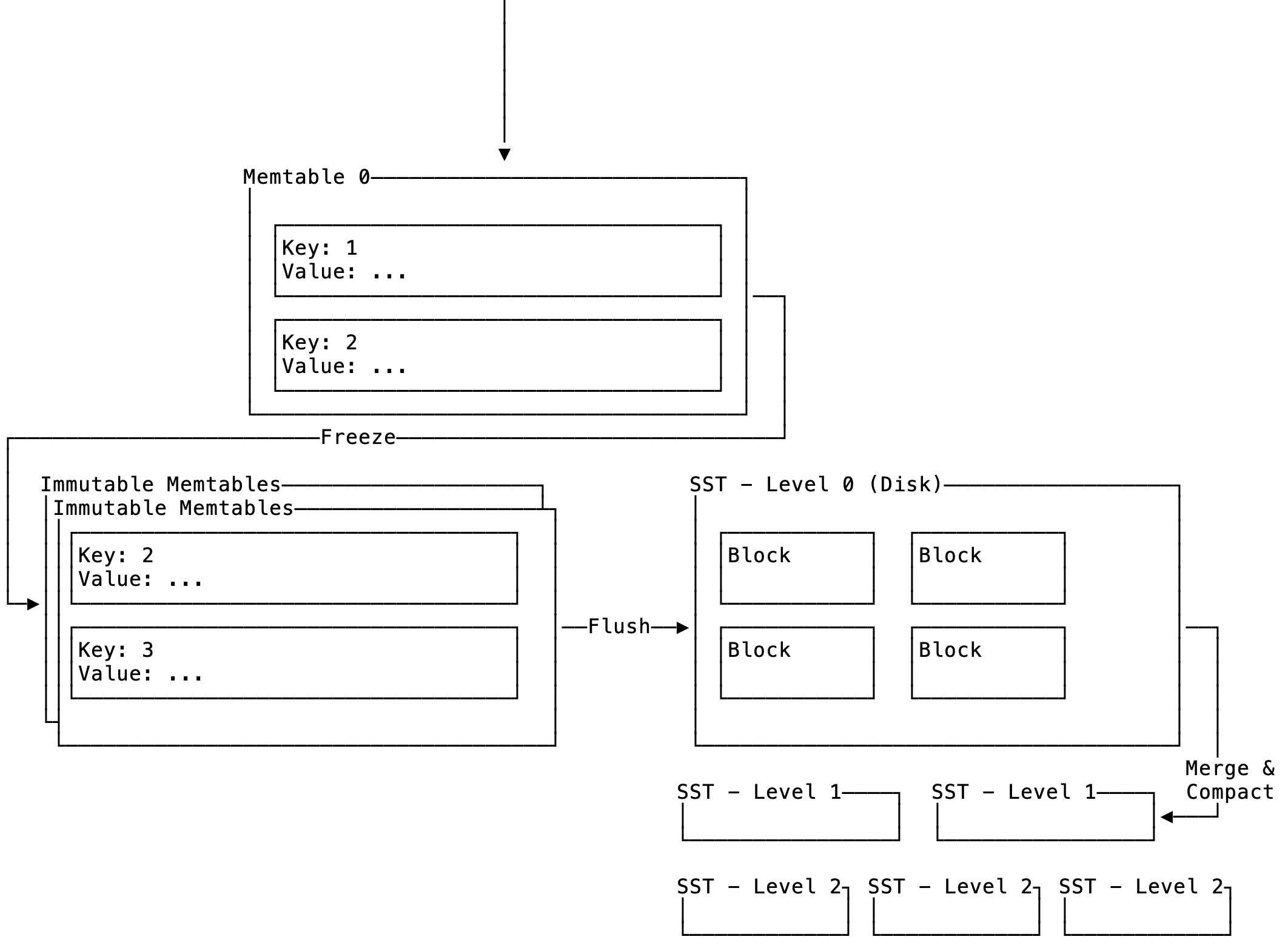
Single Computer Filesystem
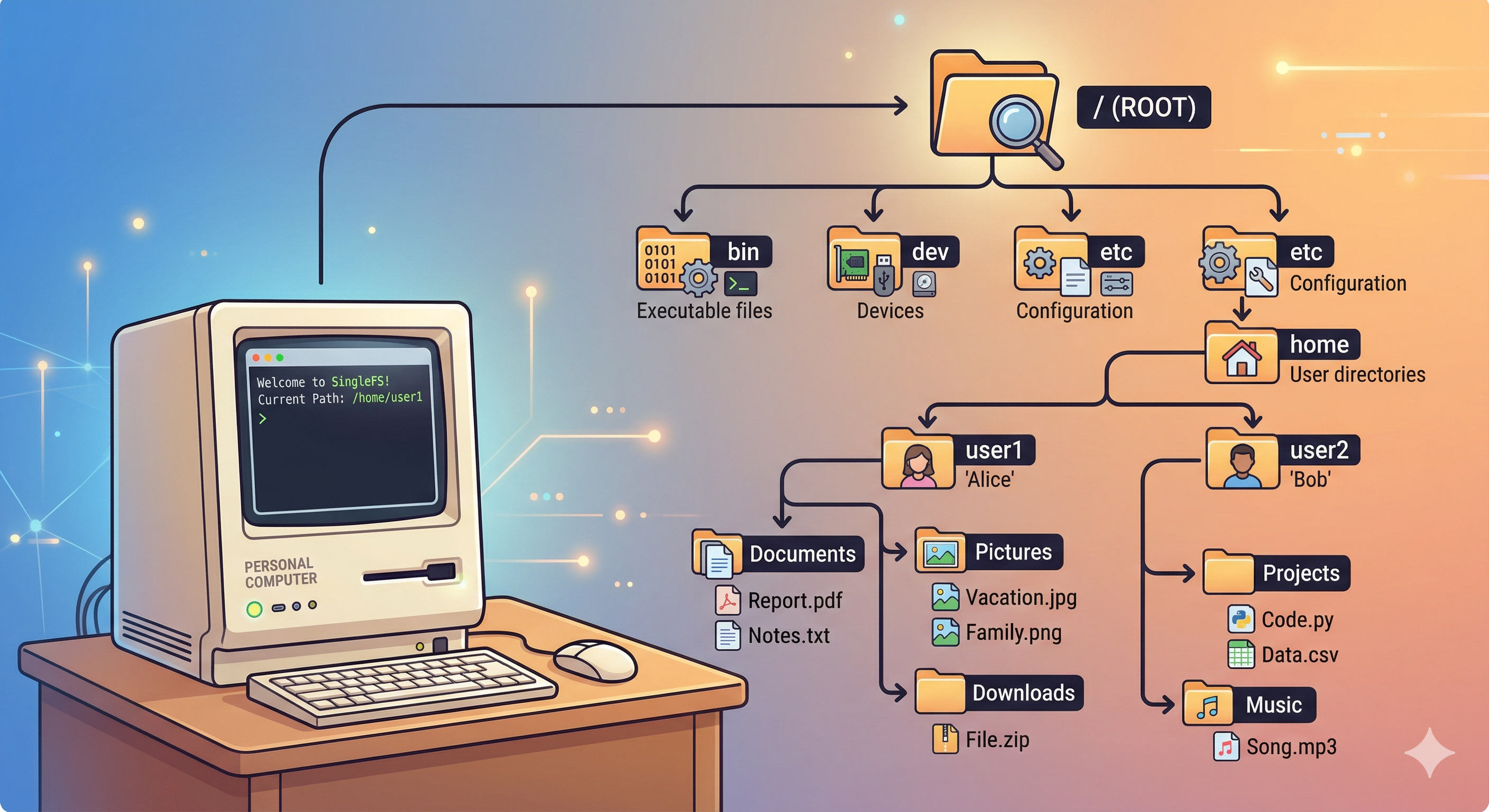 Figure 1: Single Filesystem
Suppose we are building a startup looking to provide cheap and reliable storage to the masses. We need to start with a simple MVP. For now our clients are family and friends. We have an old desktop lying around that has an old, but functional, hard drive. So we install Linux and Node.js. We can then define a simple HTTP server that will provide an API to the files using simple GET and POST. This ends up looking something like this:
┌────────────────────┐        GET               ┌────────────────────┐
│                    │─────/file1.txt─────────▶ │ Host: 192.168.x.x  │
│                    │         POST             ├────────────────────┤
│       Client       │──────file1.txt─────────▶ │      Desktop       │
│                    │          File            │                    │
│                    │◀───────contents──────────│                    │
└────────────────────┘                          └────────────────────┘
Now all our users might not be on the same network so the first step would be to setup a gateway. We can then reach for something like Ngrok. This effectively gives us a public IP address and does the NAT translation for our local network. We're going to ignore the security implications and considerations. One thing we also assume for now is that all files will live in the same directory.
Multiple Drives
Things are going well, but we reached a limitation. Our hard drive is full! Now we have two options for increasing capacity. Scale vertically or horizontally. Buying larger and larger disks is expensive, so we what about sticking with "smaller" drives and adding them to the system. The limitation now just becomes how many SATA and PCI-E ports we can get on our single machine. However, we now run into a software issue. The UNIX filesystem does not allow expanding of a directory with more hard disks. So it is time to start using subdirectories.
We now design our server to use many subdirectories spread over different disks.
How does the server know in which directory a particular file is?
We now consider two solutions: a stateful and stateless one.
- Stateful: When a file is uploaded store its location in the database and query when retrieved.
- Stateless: Use a hashing function to distribute the files across the directories.
A database is a good option, but we don't need to reach for it yet. So let's consider the hashing approach:
- Create a list containing all of the usable disks, the list holds the mount locations for the disks and where the files can be written.
- When a file is uploaded, hash its contents using some hashing function, this gives us .
- Determine the disk write location by calculating where is the number of usable disks. The calculation gives the index of the disk.
Scaling Compute
As we start serving more requests we will start to see that our little desktop computer starts stalling. Upon further investigation we start seeing that our CPU and RAM is hitting its limit. Assuming we've optimised our code as much as possible to limit memory consumption to increase request throughput we need to start looking at building a cluster.
                                                                    ----
                                                                    ┌────────────────────┐
                                      ┌ ─ ─ ─ ─ ─ ┐                 │                    │
                                                                    │                    │
                                      │Config File│          ┌─────▶│  Compute Instance  │
                                                             │      │                    │
                                      └ ─ ─ ─ ─ ─ ┘          │      │                    │
                                            │                │      └────────────────────┘
┌────────────────────┐                      │                │
│                    │                      ▼                │      ┌────────────────────┐
│                    │            ┌────────────────────┐     │      │                    │
│       Client       │─────┐      │                    │     │      │                    │
│                    │     │      │                    │     ├─────▶│  Compute Instance  │
│                    │     └─────▶│       Envoy        │─────┤      │                    │
└────────────────────┘            │                    │     │      │                    │
           │                      │                    │     │      └────────────────────┘
           └──────────┐           └────────────────────┘     │
                      ▼                                      │      ┌────────────────────┐
          ┌ ─ ─ ─ ─ ─ ─ ─ ─ ─ ─ ─ ┐                          │      │                    │
                                                             │      │                    │
          │ Hash(File) % Cluster  │                          └─────▶│  Compute Instance  │
                                                                    │                    │
          └ ─ ─ ─ ─ ─ ─ ─ ─ ─ ─ ─ ┘                                 │                    │
                                                                    └────────────────────┘
We consider a simple setup where we move the hash calculation to the client to determine the cluster. We then have a similar system on the compute instances for the directory. The client is configured to communicate with our servers through Envoy, a distributed proxy. In our small cluster we can keep track of the compute instances in a static config file. At this point in time failures are rare and manageable, but will soon become a problem as the cluster grows. This can be loaded at startup and allows us to add more Envoy instances if we need to scale without an additional control plane. This is different to something the Google Filesystem or Apache Hadoop clusters. They opt for a central server to hold the cluster metadata and deciding where to route requests. Our current setup should keep us going while, we can add new instances as needed.
Handling Failure
As we start adding instances we increase the probability of failure. A compute instance going down due to some software or non-storage related issue is not a problem, we simply replace or fix the issue directly. We are however only writing files to a single disk, which is major issue. We do run the risk of a disk dying and losing all of our user's data. There is also the issue of our hashing function when we lose a node.
Asynchronous Replication
Since we have a cluster of machines already we can leverage them to also act as additional storage locations. There are some interesting considerations when trying to design a data replication mechanism. A good tool we can use to guide our decisions is the CAP theorem.
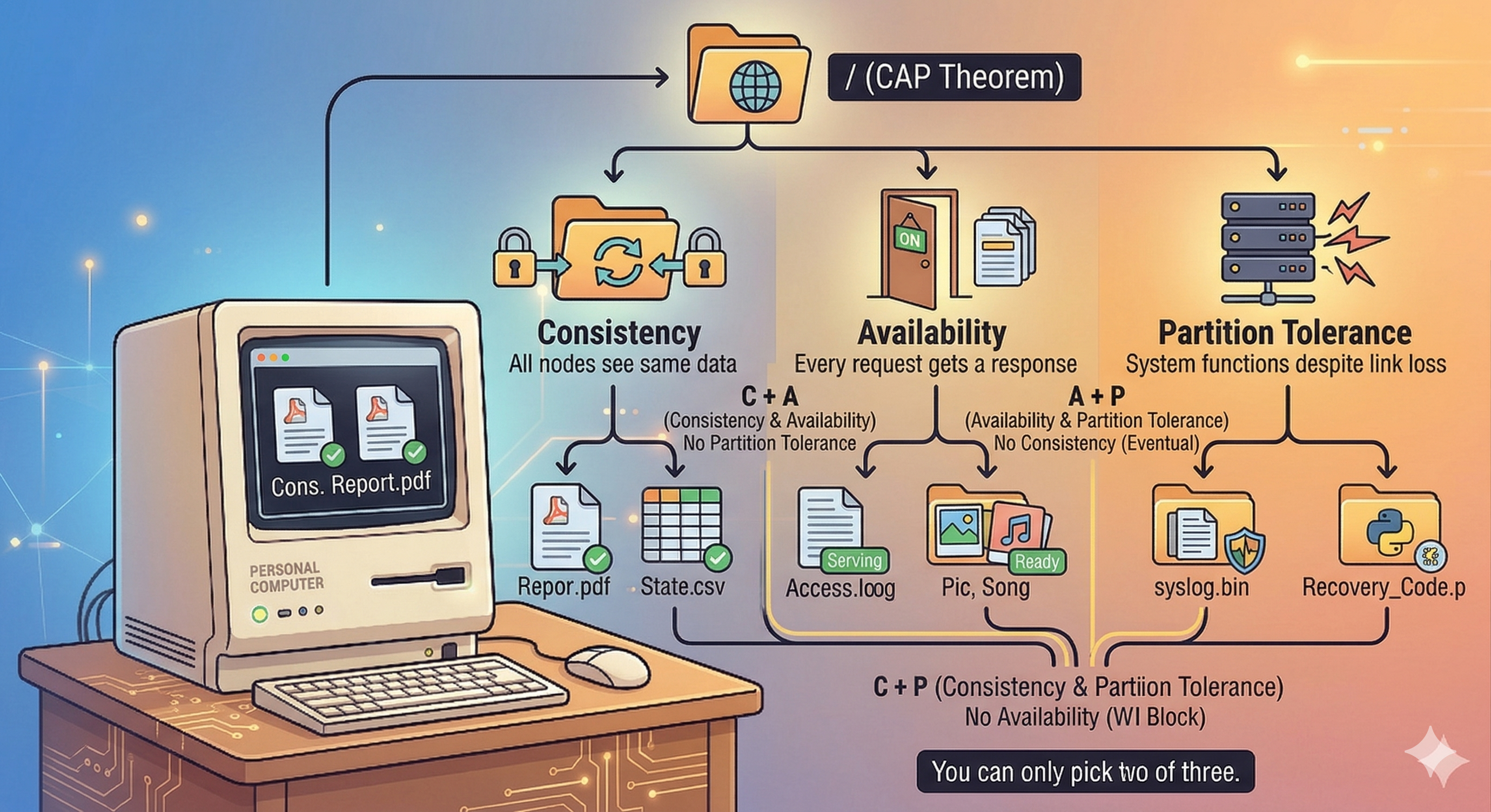 Figure 2: CAP Theorem
So as the academics have proven we can only choose two of three CAP theorem arms. Let's look at the possible combinations and the implications each has:
-
CP (Consistency + Partition Tolerance): When a user uploads a file it will first be written to a quorum of nodes in our cluster that need to acknowledge that they persisted it. If a network partition occurs and the some nodes are unable to communicate with each other, the cluster will be divided into sub-clusters. Only the cluster that forms a majority will serve requests. The smaller clusters will refuse requests thus limiting availability.
-
CA (Consistency + Availability): This combination also only acknowledges a file upload once it has been persisted by some number of configured nodes. However if a network partition occurs then no requests will be served.
-
AP (Availability + Partition Tolerance): This is what modern object storage systems use, the idea being that you always serve requests no matter the network conditions. However, since the file uploads will not always replicate to all nodes immediately under difficult network conditions subsequent reads will not show the latest file contents or some files might be missing.
I think depending on scale optimising for consistency and availability actually makes sense. Since if the cluster is small the chance of a network partition is smaller and more manageable. The reason cloud storage solutions like S3 and Google Cloud Storage choose availability and partition tolerance is due to the scale they operate at and network partitions are the norm rather than the exception.
If we choose to optimise for availability and partition tolerance the replication strategy will work as follows:
- User uploads file using HTTP client.
- Envoy will inspect request and route the request to a compute instance.
- Once the instance has persisted the file it acknowledges the request and the client receives a response.
- This will then asynchronously trigger a sync procedure which will then periodically sync the persisted files with some subset of nodes in the cluster.
Consistent Hashing
Currently as we add new compute instances our naive hashing function will cause a redistribution of the files stored throughout the system. So files will also need to be migrated to different servers. To motivate this need we can use a probability perspective:
When you have a list of servers (buckets), a good hash function behaves like a uniform random function meaning each file will be mapped to a server with a probability . Now we can express the load of a server as follows:
- Assume we have to store files across servers
- We define a variable number of keys assigned to server
- The expected load of server is (average number of files stored on server)
- You can then decompose into a series of coin flips: where is the probability that a file is stored on server . This is also known as a Bernoulli random variable.
- With a good hash function we know that , the expected value of can be expressed as:
Rewriting as:
Substituting with :
Simplifying:
Then since , the expected value is: , using linearity we can rewrite the expression as .
Expected load of a server in a cluster of servers needing to store files is
This is obviously the average load not the maximum, but it is still a pretty nice property to have in general. This means no server wil be "hot" compared to the others. However the critical flaw is when we add or remove a server. The full explanation of how consistent hashing works is a bit involved (read here for a nice explanation), but the idea is that when the number of servers is re-sized only files need to be remapped. This is an improvement since without consistent hashing you need to remap almost all files.
The key visual with consistent hashing is the hash ring:
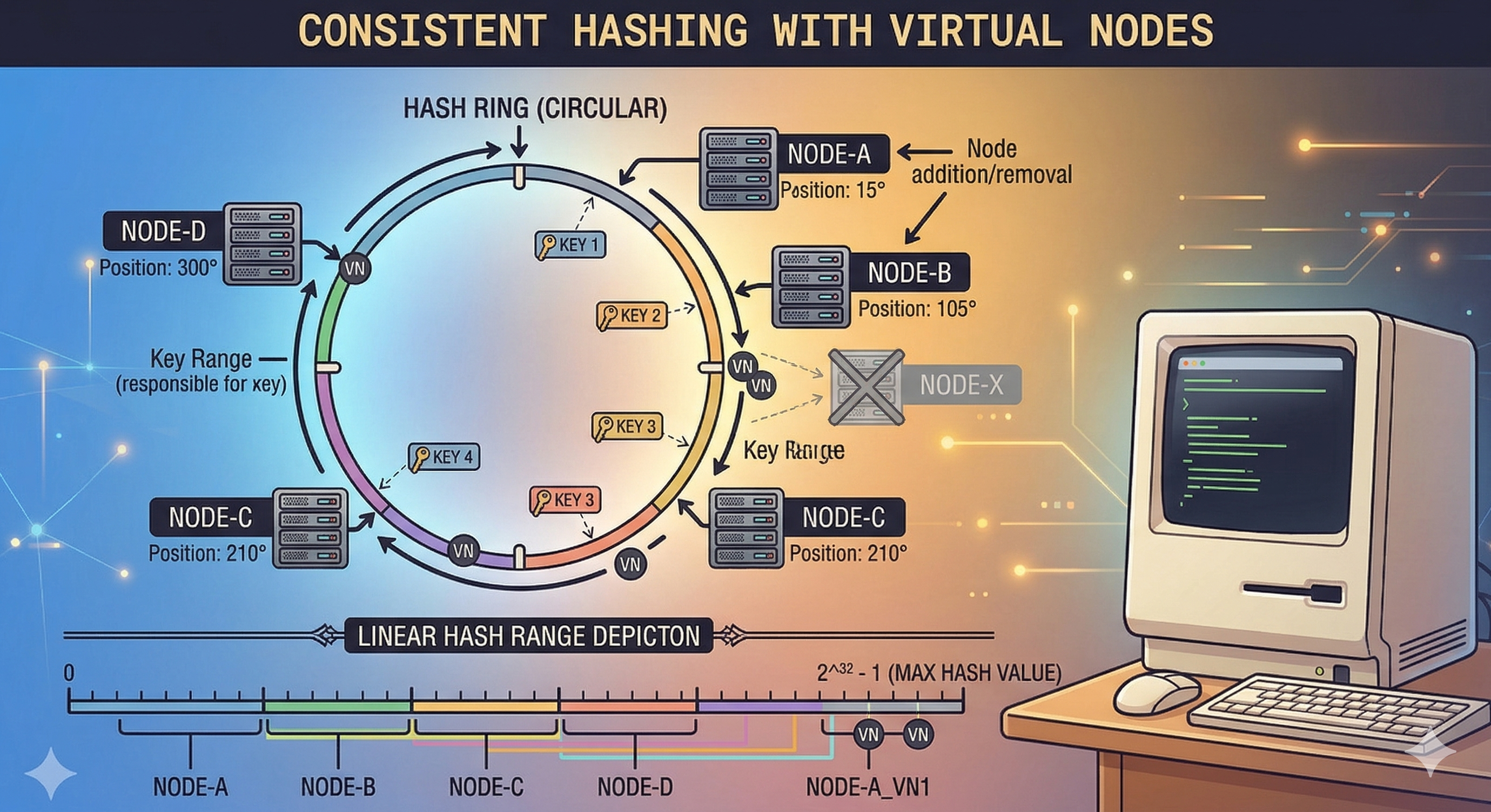 Figure 3: Hash Ring
The hash ring represents the range of values that the chosen hash function can output. Each server in the cluster is given a subset of this range which is indirectly the files it will manage. There is an additional of virtual nodes to help distribute the files more evenly across the servers.
The server that receives a file will be the coordinator for that file and is responsible for replicating it to the other nodes.
Google File System
Before we can look at how Colossus works, we need to look at its predecessor: GFS. GFS is described as "a scalable distributed file system for large distributed data-intensive applications". A GFS cluster consists of a single master node and multiple chunk servers.
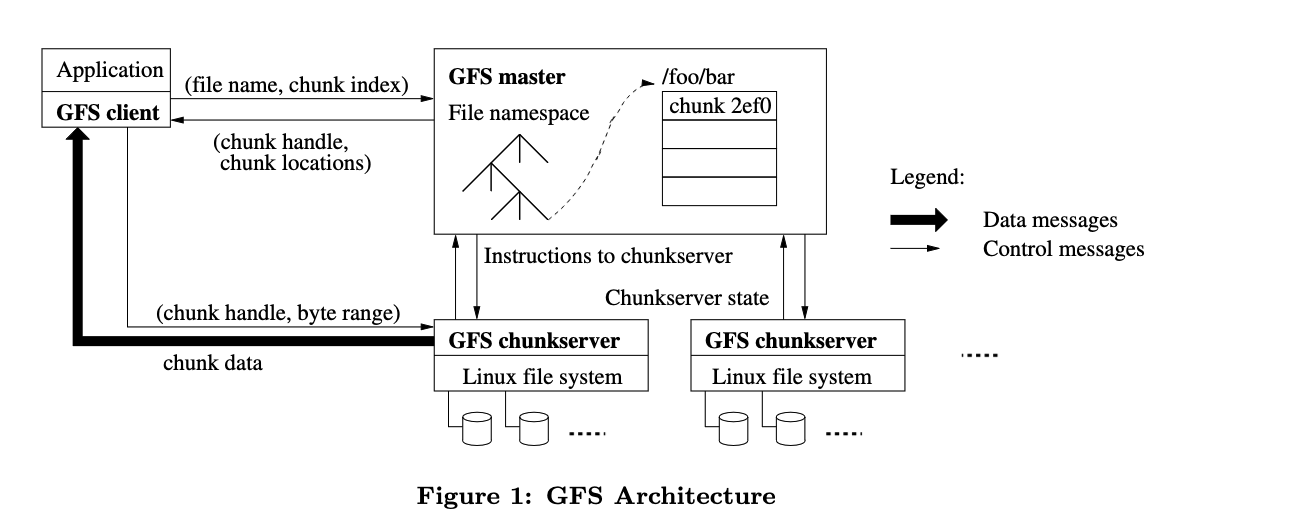 Figure 4: Google File System Architecture
We can clearly see two differences to our distributed filesystem design:
- A single master server to track state
- File hierarchies
Using a master server removes the complexities of the consistent hashing approach at the cost of having a single point of failure. Using hashing for files also introduced complexities when you're dealing with nested structures such as subdirectories so having a single node to keep track of file hierarchies makes sense. GFS uses chunk servers which store only parts of files, since the file system needs to be able to store multi-GB files efficiently.
Write Path
- A client will send a request to the master server and simply specify the file name, namespace, access controls and file size.
- The master will break up the file size into 64MB chunks.
- Each chunk is assigned a 64byte chunk handle.
- The chunk handle is also associated with a byte offset within a chunk if it is smaller than the chunk.
- The master also decides which chunk servers should store the chunks (it routinely gets the chunk server states from the cluster).
- The chunk locations are then returned to the client.
- The client then actually writes the data to the chunk servers.
The master server plays the role of the coordinator and does not actually touch the data. It decides where and how the data is stored. This design decision makes sense as the master server needs to handle alot of requests so it needs to do as little work as possible. The I/O intensive work can then be spread across the entire chunk server cluster.
Read Path
- Using the fixed 64MB chunk size a GFS client will translate the file into chunk indices.
- It sends the indices and file name to the master.
- The master responds with the chunk handles and replica locations.
- The client sends a request to the replica containing the chunk handle and byte offset.
- The client also caches the locations of the replicas thus no longer interacting with the master when reading the same chunk.
Consistency Model
GFS is described to have a "relaxed consistency model". They do however provide stronger consistency guarantees for things like file namespaces, which is trivial to do since they need to go through a single master, which defines a global order for the operations. Mutations to chunks which hold data for possibly different files have a defined order. An interesting aspect of GFS is that it does synchronous replication. As part of the write path a client needs to first send the data to all the replicas returned by the client. Only once the replicas have acknowledged that they received the data will the client write the data to the primary. The primary might be handling write requests from multiple clients so it records the order in which the mutation were performed. This order is then communicated to the replicas so that they perform the writes in the same order.
Colossus
Colossus is the next evolution of GFS and aims to be bigger and faster. It is unfortunately not as well documented as GFS so we can only rely on the blog posts to explain how it works. Colossus still builds on the GFS backbone, but has expanded and improved how the file metadata is managed.
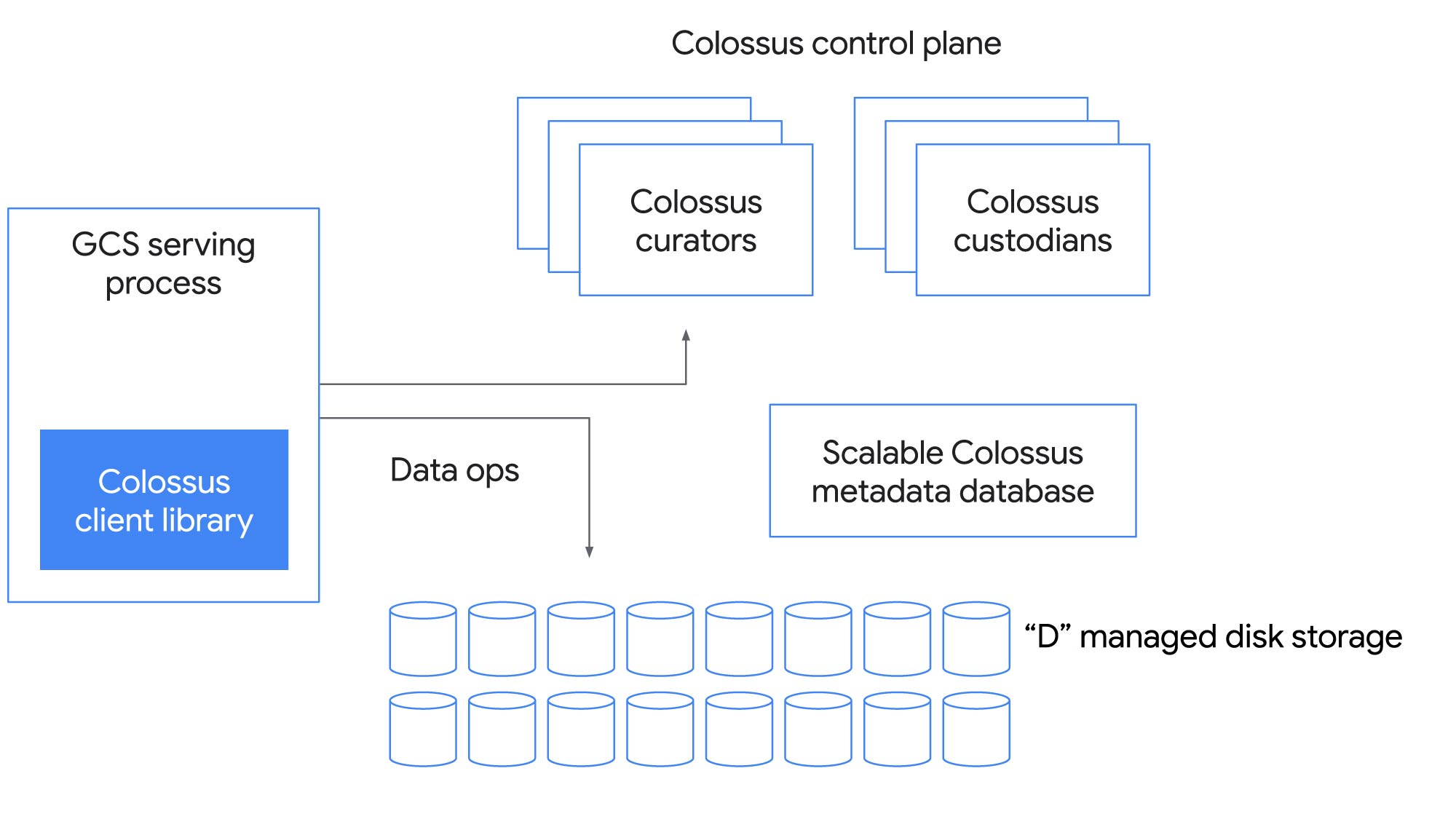 Figure 5: Colossus Architecture
This is the most notable change in the architecture, instead of the single master the master is distributed across multiple nodes. The way they achieved this is by leveraging another Google product: BigTable. Which in turn raises another very interesting point: BigTable stores its data on Colossus!
---
            .───────.
          ,'         `.
         ╱             ╲
        ;   Colossus    :
     ┌─▶:               ;──┐
     │   ╲             ╱   │
     │    ╲           ╱    │
     │     `.       ,'     │
     │       `─────'       │
  Stores                Stores
 SSTables              Metadata
    On                    On
     │                     │
     │      .───────.      │
     │    ,'         `.    │
     │   ╱             ╲   │
     │  ;   BigTable    :  │
     └──:               ;◀─┘
         ╲             ╱
          ╲           ╱
           `.       ,'
             `─────'
This circular dependency might look like an impossible system(that's what I thought), but there is a hidden detail. The full Colossus service is actually a hierarchy of Colossus services nested inside each other.
Colossus Service─────────────────────────────────────────────┐
│                                                            │
│ BigTable─────────────────────────────────────────────────┐ │
│ │                                                        │ │
│ │ Colossus────────────────────────────────────────────┐  │ │
│ │ │ Chubby────────────────────────────────────────┐   │  │ │
│ │ │ │                                             │   │  │ │
│ │ │ │                                             │   │  │ │
│ │ │ │                                             │   │  │ │
│ │ │ │                                             │   │  │ │
│ │ │ │                                             │   │  │ │
│ │ │ └─────────────────────────────────────────────┘   │  │ │
│ │ └───────────────────────────────────────────────────┘  │ │
│ └────────────────────────────────────────────────────────┘ │
│                                                            │
└────────────────────────────────────────────────────────────┘
Chubby is another Google service and is their distributed locking service. In this context it is apparently used to bootstrap a small Colossus cluster which instead depends on BigTable which is built on Chubby instead of Colossus, thus breaking the cycle.
Recall that one of the components of Colossus are the "Curators". These run in BigTable tablet servers, a tablet is a logical split of a larger table. It is a set of consecutive rows of a table. A row in a table corresponds to a single file:
Row─────────────────────────────────────────────────────────────────────────────┐
│┌─────────────┐ ┌─────────────┐ ┌─────────────┐                                │
││             │ │             │ │             │                                │
││  Filename   │ │  Checksum   │ │   Length    │                                │
││             │ │             │ │             │                                │
│└─────────────┘ └─────────────┘ └─────────────┘                                │
│┌─────────────┐                 ┌─────────────┐ ┌─────────────┐ ┌─────────────┐│
││             ├────────────────▶│             │ │             │ │             ││
││  Stripe 0   │ ┌─────────────┐ │   Chunk 0   │ │   Chunk 1   │ │   Chunk 2   ││
││             │ │    State    │ │             │ │             │ │             ││
│└─────────────┘ └─────────────┘ └─────────────┘ └─────────────┘ └─────────────┘│
│┌─────────────┐                 ┌─────────────┐                                │
││             ├────────────────▶│             │                                │
││  Stripe 1   │ ┌─────────────┐ │   Chunk 3   │                                │
││             │ │    State    │ │             │                                │
│└─────────────┘ └─────────────┘ └─────────────┘                                │
└───────────────────────────────────────────────────────────────────────────────┘
Colossus still uses the GFS chunking system, but extends it with the concept of stripes. A stripe refers to a replication unit and is used to track the state of the replication of the assigned chunks. This is pretty much the extent of information I could dig up on the design of Colossus so unfortunately this is where our adventure comes to an end.
Conclusion
We started off with a single system and saw how it can evolve into a deep interconnected system. It's really interesting how the simple act of just adding hard drives can cause such complexity. Furthermore as the system scales it becomes less (even though still important) about storing the files and more about managing the file metadata.